
Your iPad
Review work, reply to agents, approve actions, and use tools.
Remote coding agents on iPad.
Run real Codex tasks from the couch, train, or garden while your code and credentials stay on a computer you trust.
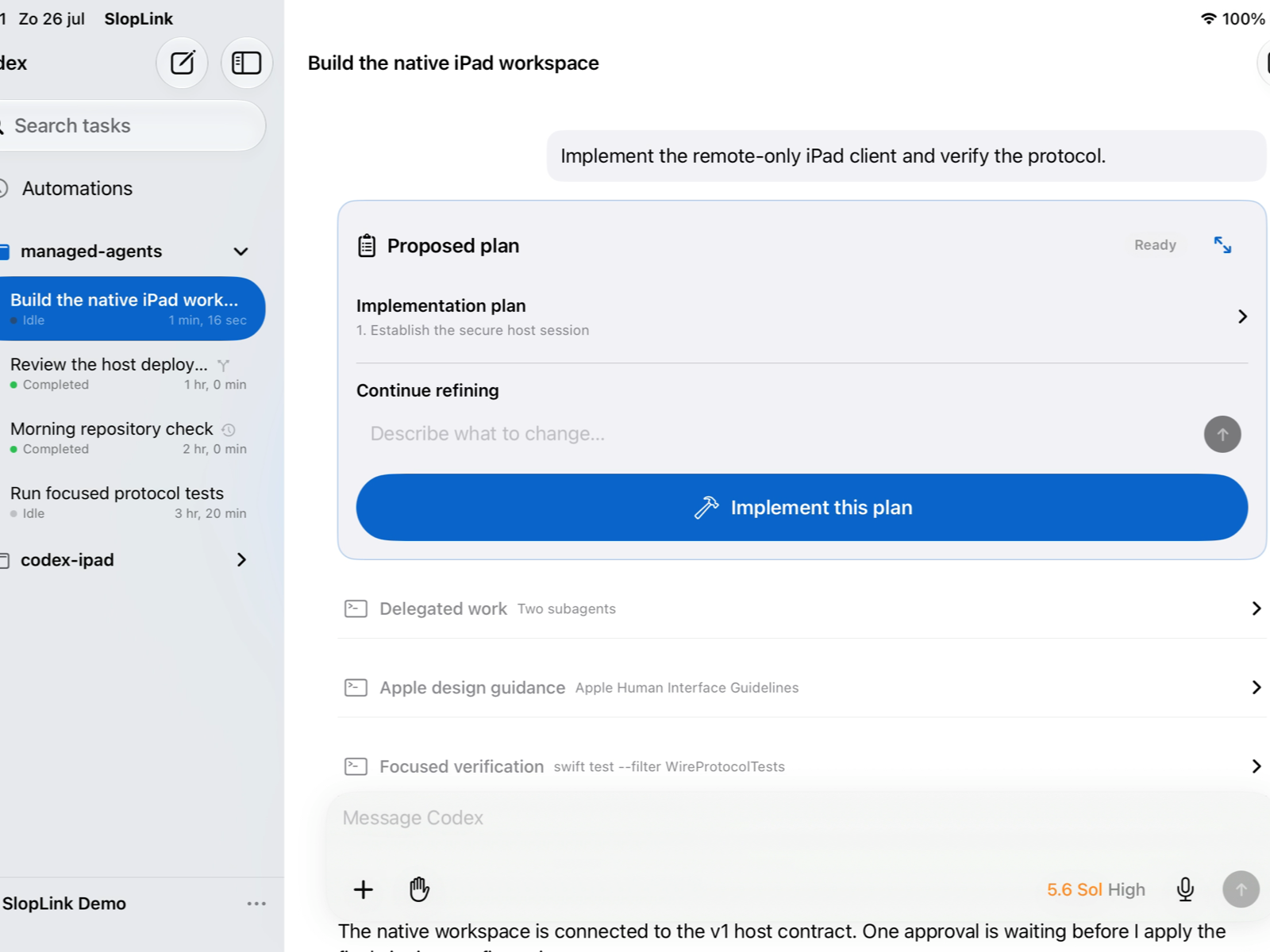
SlopLink is a remote control, not a cloud IDE. The iPad connects directly to one trusted host over your private Tailscale network.
Review work, reply to agents, approve actions, and use tools.
Pairs one device credential and exposes only the local bridge.
Credentials, tools, files, and agent processes stay on the host.
Pair only a host and iPad you control. SlopLink has no relay and does not receive your repository, OpenAI credential, terminal history, or provider tokens. Revoking a paired device cuts off its access.
Every download is exposed only after its Ed25519 manifest signature and required package set are verified.
SlopLink Host is installed on the computer that runs Codex — not on the iPad. Packages are served from downloads.sloplink.app.
No mystery installer. Verify the release, keep Codex credentials local, preview networking changes, and pair with a single-use code.
Choose the package for the computer that already has access to your projects.
Sign in to Codex on that computer. Your OpenAI credential never moves to the iPad.
Use the read-only Tailscale plan first, then explicitly apply Tailscale Serve.
Doctor verifies Codex, storage migrations, projects, and optional browser support.
Enter the short-lived six-digit code in SlopLink. The code is single use.
Compare the first output with the SHA-256 shown above. The signature check must name an identified Apple developer.
shasum -a 256 ~/Downloads/sloplink-host-*.pkgpkgutil --check-signature ~/Downloads/sloplink-host-*.pkgsudo installer -pkg ~/Downloads/sloplink-host-*.pkg -target /Expected: installer: The upgrade was successful.
Run the shared setup sequence above as your normal macOS user. The host keeps configuration in ~/.config/sloplink and data in ~/.local/share/sloplink. Check the per-user LaunchAgent ~/Library/LaunchAgents/nl.mennoterlaak.sloplink.host.personal.plist (label nl.mennoterlaak.sloplink.host.personal) with:
sloplink-host service-status --profile personalDownload the new signed package, re-run both verification commands, then install it over the existing version. Configuration and pairing data are retained.
sloplink-host service-uninstall --profile personalsudo rm /usr/local/bin/sloplink-hostsudo pkgutil --forget nl.mennoterlaak.sloplink.hostRemove /usr/local/bin/codexpad-host only when it is still the package-created symlink to sloplink-host. Leave ~/.config/sloplink and ~/.local/share/sloplink in place if you may reinstall. Service removal never deletes configuration, paired-device data, credentials, or legacy state.
uname -mx86_64 → x86_64 packageaarch64 or arm64 → arm64 packagesha256sum ~/Downloads/sloplink-host-*Then use exactly one matching installation path:
sudo apt install ~/Downloads/sloplink-host_*.debsudo dnf install ~/Downloads/sloplink-host-*.rpmFor the raw binary, select the architecture deterministically, compare the printed checksum with the signed manifest above, and only then replace the executable atomically:
case "$(uname -m)" in
  x86_64) arch=x86_64 ;;
  aarch64|arm64) arch=aarch64 ;;
  *) echo "Unsupported architecture" >&2; exit 1 ;;
esac
artifact="$HOME/Downloads/sloplink-host-linux-$arch"
sha256sum "$artifact"mkdir -p "$HOME/.local/bin"
staged="$(mktemp "$HOME/.local/bin/.sloplink-host.XXXXXX")"
install -m 0755 "$artifact" "$staged" &&
mv -f -- "$staged" "$HOME/.local/bin/sloplink-host"Alpha 1 provides the old command name for one compatibility release. Create or refresh it only when the path is absent or already the SlopLink-managed symlink:
legacy="$HOME/.local/bin/codexpad-host"
if [ ! -e "$legacy" ] && [ ! -L "$legacy" ]; then
  ln -s sloplink-host "$legacy"
elif [ -L "$legacy" ] && [ "$(readlink "$legacy")" = "sloplink-host" ]; then
  ln -sfn sloplink-host "$legacy"
else
  echo "Refusing to replace $legacy" >&2
fiRun the shared setup sequence above. It installs and starts the per-user service only after the configuration is valid. The personal profile definition is ~/.config/systemd/user/sloplink-host-personal.service.
sloplink-host service-status --profile personalExpected: SlopLink Host service is active.
Install a newly downloaded and verified DEB with apt install, or an RPM with dnf upgrade. For a raw-binary upgrade, repeat the checksum and atomic replacement commands above, then restart the profile:
systemctl --user restart sloplink-host-personal.serviceStop and remove the service metadata first. Then remove the package with your package manager, or use the guarded raw cleanup below:
sloplink-host service-uninstall --profile personalsudo apt remove sloplink-hostlegacy="$HOME/.local/bin/codexpad-host"
if [ -L "$legacy" ] && [ "$(readlink "$legacy")" = "sloplink-host" ]; then
rm -- "$legacy"
fi
rm -f -- "$HOME/.local/bin/sloplink-host"On Fedora/RHEL use sudo dnf remove sloplink-host. Do not run the raw cleanup after a DEB or RPM install; let the package manager own those files. Every uninstall path retains ~/.config/sloplink and ~/.local/share/sloplink.
Open PowerShell and verify before running it:
Get-FileHash "$HOME\Downloads\Install-SlopLinkHost.ps1" -Algorithm SHA256Get-AuthenticodeSignature "$HOME\Downloads\Install-SlopLinkHost.ps1" | Format-List Status,SignerCertificateExpected: Status: Valid
The exact install command appears after the signed release is verified.
The verified release supplies both required inputs. If Windows requests a restart, restart and run the same signed command again. It installs Ubuntu 24.04 and continues inside WSL2.
wsl.exe -d Ubuntu-24.04Install Codex and Tailscale inside the WSL environment, then run the shared setup sequence above. SlopLink labels this as a Windows/WSL2 host, but the host process itself is Linux.
Re-run a newly downloaded, verified bootstrap to upgrade. To remove only SlopLink inside Ubuntu while retaining config, data, and credentials, remove the sloplink-host-personal.service definition first:
sloplink-host service-uninstall --profile personalrm ~/.local/bin/sloplink-hostRemove ~/.local/bin/codexpad-host only if it is the matching compatibility symlink. Removing the entire WSL distribution also deletes its files and is intentionally not part of this guide.
doctor cannot find CodexRun codex --version in the same user session. Fix that command first, then restart the SlopLink service.
Do not add --apply. Confirm both devices share the intended tailnet and the hostname ends in .ts.net.
Generate a fresh code locally. Codes are deliberately short lived and cannot be reused after a successful attempt.
The provided command changes policy only for the current PowerShell process and still requires a signed script. If MachinePolicy or UserPolicy overrides it, ask the Windows administrator to allow the signed SlopLink publisher through managed Group Policy; never switch to a permanent Bypass.
Still stuck? Send the redacted doctor result to alpha@sloplink.app. Never send tokens, pairing codes, configuration secrets, or private paths.
Five hands-on pilot testers go first: two on macOS, two on Linux, and one on Windows/WSL2. We expand only after four pair successfully and no release-blocking issue remains.
Five pilot places open first, then twenty more.
We choose a useful mix of host platforms and workflows, not the fastest 25 clicks. Thoughtful applications get a human reply.
Apply
Two minutes, no account.
Get selected
We review platform fit.
Install + pair
Concierge help for the pilot.
SlopLink sends prompts, responses, project and terminal content, selected attachments, browser activity, automation details, and device and pairing identifiers to the trusted host you pair. The host stores that data to provide the product. Timeline events are kept for up to seven days or 100,000 events by default; temporary attachments are scheduled for removal after 24 hours. Device records, automations, and the optional Chrome profile remain until you delete them.
Your content is processed through your own Codex account by OpenAI. Apple processes notification tokens and delivery metadata; Tailscale and your chosen infrastructure provider process the network and host data needed to run the service. Websites opened through remote Chrome receive normal browser traffic. SlopLink does not use this data for advertising, cross-app tracking, or data-broker sharing.
During optional guided setup, a SlopLink-operated coordinator temporarily receives your selected platform, provider and connectivity choices, setup progress and errors, and—when setup completes—the host name, private HTTPS origin, and six-digit pairing code. Coordinator sessions are removed after 30 minutes. Cloudflare and the hosting provider may retain normal security and access logs under their own operational policies. Provider credentials go directly from your iPad to the selected provider and are not stored by the coordinator.
Removing only the host service deliberately preserves its configuration, database, credentials, and browser profile. Those files remain under your control on the host and must be removed separately when you want a full deletion. Contact us for an assisted export or deletion checklist.
The alpha form separately stores your name, email, timezone, iPad and host setup, use case, feedback commitment, referral source, and consent timestamp so we can select and support testers. Application data is removed 90 days after the campaign closes unless you ask us to keep in touch. The site has no analytics, advertising, uploads, tracking cookies, or public accounts. A salted network fingerprint and hourly attempt count protect the form from abuse.
privacy@sloplink.appUse TestFlight feedback for app issues and email us for pairing, host installation, privacy, or access questions. Include your platform and redacted doctor output — never secrets.